


The new EA soccer simulation now free for Windows 8
This program can no longer be downloaded. Take a look at FIFA 15 UT for Windows 8 instead.
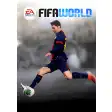
FIFA 14 finally arrives free for Windows 8. EA puts the strongest emphasis on Ultimate Team, whereas some of the other game modes are only available through in-app purchases. FIFA 14 has a great game interface and new touch controls.
This release for Windows 8 is a ported release for smartphones, ideal for touch devices, and differs much in terms of features and technical quality compared to the desktop version of FIFA 14.
Ultimate Team and in-app purchases
FIFA 14 allows you to play matches in Ultimate Team, Games of the Week, Support Your Club, Penalty Shootout, and Online modes.
The modes let you challenge other players all over the world through its multiplayer function. Try to beat them and climb the worldwide leaderboard!
Manager, Tournament and Kick Off modes, however, are only unlockable via in-app purchases.
Just like in the PC and console versions FIFA 14 for iPhone also brings back Match of the Day, a function that lets you reflect on the events of real life games from every single team. You can see injuries, if players are on form, or changes to tactics; these are reflected in the game from time to time with corresponding updates to the team lineup.
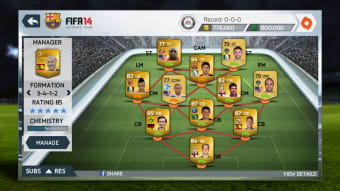
FIFA 14 for Windows 8 is strongly in favor of Ultimate Team mode, which lets you create and manage your virtual team. You can participate in auctions to buy and sell players, trying to grow your team and the camaraderie between your players. And of course, you can participate in games and competitions with your Ultimate Team. If you win, you get points and virtual money to spend so that you can buy new cards to improve your team.
FIFA 14 supports 33 leagues (Serie A, La Liga, Premier League, Bundesliga...), more than 600 fully-licensed teams, over 16,000 players and as many as 34 stadiums, faithfully recreated in the app. And just as you can on the console version, you can get get trophies and achievements when you fulfill certain objectives.
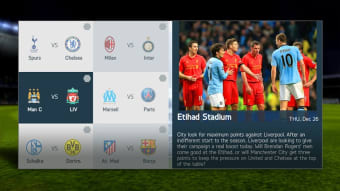
The game interface follows the same style and design of the desktop version of the game, offering excellent usability and navigability through the menus.
New touch controls
FIFA 14 also introduces a new type of touch control, based on gestures, swiping and tapping. The idea is interesting, but it does requires a bit of practice to feel confident with the controls. To this end, the game includes an in-depth tutorial that explains how to use the new controls. If you're not interested in using the touch controls, you can control the game with the same methods using your mouse.
If you prefer the old and classic virtual joypad, you can still select it from the options menu. During our test, we got a better feeling with this set of controls rather than with the new gesture-based ones.
Slightly better graphics, excellent soundtrack
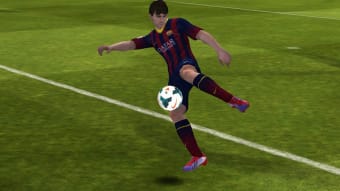
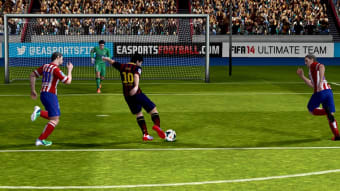
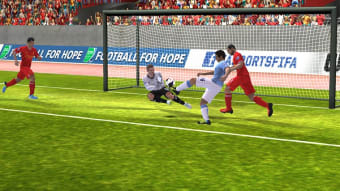
The 3D graphics are good, but not excellent. The engine is definitely less powerful than the one used in the classic version of FIFA 14. Animations and movements of the players are a bit slow, but the gameplay doesn't suffer exceedingly. Greater fluidity and speed in the pace of the action, however, would improve the title. "
The music on the menu is excellent, but it isn't new: EA has always looked after the entire soundtrack of the FIFA franchise.
The sound effects during the match are pretty average and not much different than the previous release. The presence of the commentary (in English, Italian, Spanish, German and French), however, makes the game more exciting.
FIFA is free, at last!
FIFA 14 for Windows 8 is an innovative release of the EA game. The freemium approach lets you play a free alternative to a release of the famous football simulator, and with other modes offered as in-app purchases (Manager, Tournament, and Kick Off), you'll be able to increase the depth of the game.
Those available by default, however, still allow a fair amount of challenge, particularly the excellent Ultimate Team, and the online multiplayer mode. The tutorials are carefully thought out and available for any game mode.
The new touch controls (or via the mouse) are a big gamble for EA, and have a significant impact on the gameplay . Personally, I still prefer the playing with a virtual joypad, which I still think is the best way to enjoy rewarding gameplay– but this is just a matter of taste.
This release, as mentioned, is a mere porting of the version released on Android, iPhone and Windows Phone. It doesn't add any more features, which would have been welcome considering the greater power of a PC or tablet with Windows 8.
Despite some gaps in the sound effects, some animations, and an unconvincing pace that's sometimes slow, this release of FIFA 14 for touch devices is quite good and, best of all, is free .
Ultimately, the Metro version / Modern FIFA 14 is ideal for anyone who uses an underpowered PC, or for those who want to have a first approach with the EA simulator. If you're a hardcore gamer, you'll want to go straight to the most advanced and complete desktop version of the EA simulator.